Custom Deep Link Actions
Documentation on how to intercept and customize deep link resolution using the deeplink-url-custom-action filter in Appmaker.
Overview
In the Appmaker architecture, deep link resolution follows a specific hierarchy. If the core fails to resolve a URL to a standard action (like opening a product or collection), it triggers the deeplink-url-custom-action filter. This allows developers to implement custom routing logic or handle proprietary URL structures.
Implementation
The customization is handled through the Filters API. For the filters to take effect, they must be registered within the activate function of your theme or extension. This ensures that the logic is initialized when Appmaker loads your package.
Filter Registration
You should add the filter inside your main entry file (e.g., src/index.js or index.js).
import { appmaker } from '@appmaker-xyz/core';

export function activate(params) {
  // Registering the deep link filter
  appmaker.addFilter(
    'deeplink-url-custom-action', // Filter Name
    'my-theme-deeplinks',         // Unique Tag
    (currentAction, { url }) => {
      // url: The full deep link URL received by the app
      // currentAction: The action resolved so far (null if not yet resolved)

      // 1. Check if it's already resolved by core/other filters
      if (currentAction) {
        return currentAction;
      }

      // 2. Custom routing logic
      if (url.includes('/promo/')) {
        return {
          action: 'OPEN_COLLECTION',
          params: {
            collectionHandle: 'promotional-items'
          }
        };
      }

      // 3. Handling specific URLs for custom behavior
      if (url === 'yourdomain.com://products/blue-shirt') {
        return {
          action: 'OPEN_WEBVIEW',
          params: { url: 'https://example.com/' }
        };
      }

      return currentAction;
    },
    100 // Priority (higher runs after internal resolution)
  );
}
Action Schema
The filter must return a valid Appmaker Action Object. Common actions include:
| Action | Parameters | Description |
|---|---|---|
OPEN_PRODUCT | { productHandle: string } | Opens a product page |
OPEN_COLLECTION | { collectionHandle: string } | Opens a collection page |
OPEN_WEBVIEW | { url: string } | Opens in an in-app browser |
GO_TO_HOME | None | Navigates to the Home tab |
OPEN_CART | None | Navigates to the Cart page |
OPEN_LOGIN_PAGE | None | Opens the login screen |
NO_ACTION | None | Explicitly ignores the deep link |
Testing with ADB (Android)
You can test your deep link resolution without manual tapping by using the Android Debug Bridge (ADB).
Command Structure
adb shell am start -a android.intent.action.VIEW -d "YOUR_URL" YOUR_PACKAGE_ID
Examples
In the development build, only the yourdomain.com://products/ schema pattern is supported. Replace yourdomain.com with your app's configured domain.
1. Opening a product page:
adb shell am start -a android.intent.action.VIEW -d "yourdomain.com://products/blue-shirt" com.coffye.isyvqq
2. Opening a collection:
adb shell am start -a android.intent.action.VIEW -d "yourdomain.com://collections/promotional-items" com.coffye.isyvqq
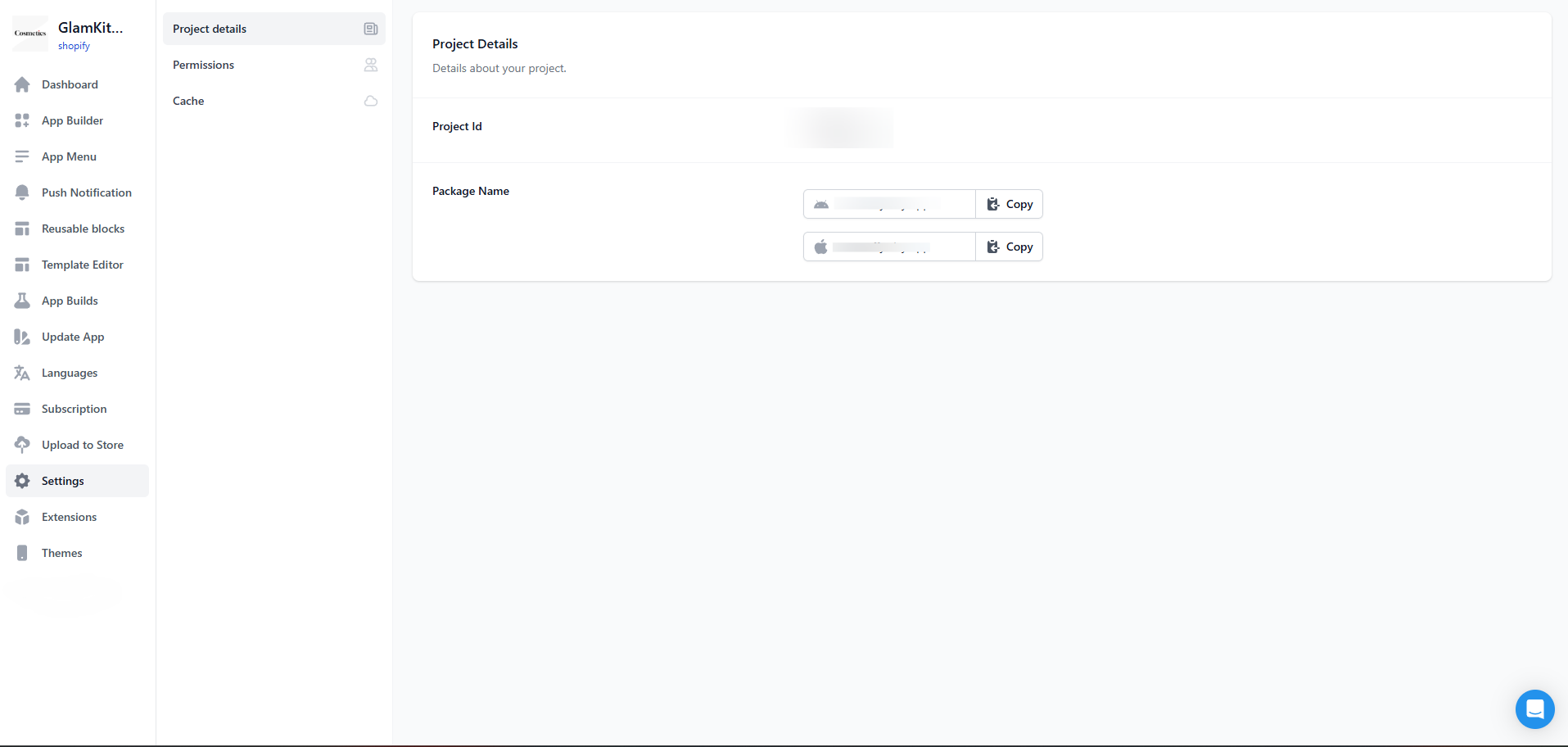
Obtaining Package ID
The Package Name (e.g., com.coffye.isyvqq) can be found in the Appmaker Console:
- Log in to the Appmaker Dashboard.
- Select your project.
- Click on the Settings tab in the left-hand menu.
- Locate the Package Name under the Project Details section.